The scary part isn't the wrong edit
It's that by the time you see the wrong edit, it already happened. An agent with a write_file tool is a process with commit rights to your working tree, and its error mode is silent: the file changed, the tests still pass, and you find out three commits later.
The usual mitigations are all after the fact. Work on a branch. Keep the diff small. Read the summary it printed. All of that assumes the write already went through.
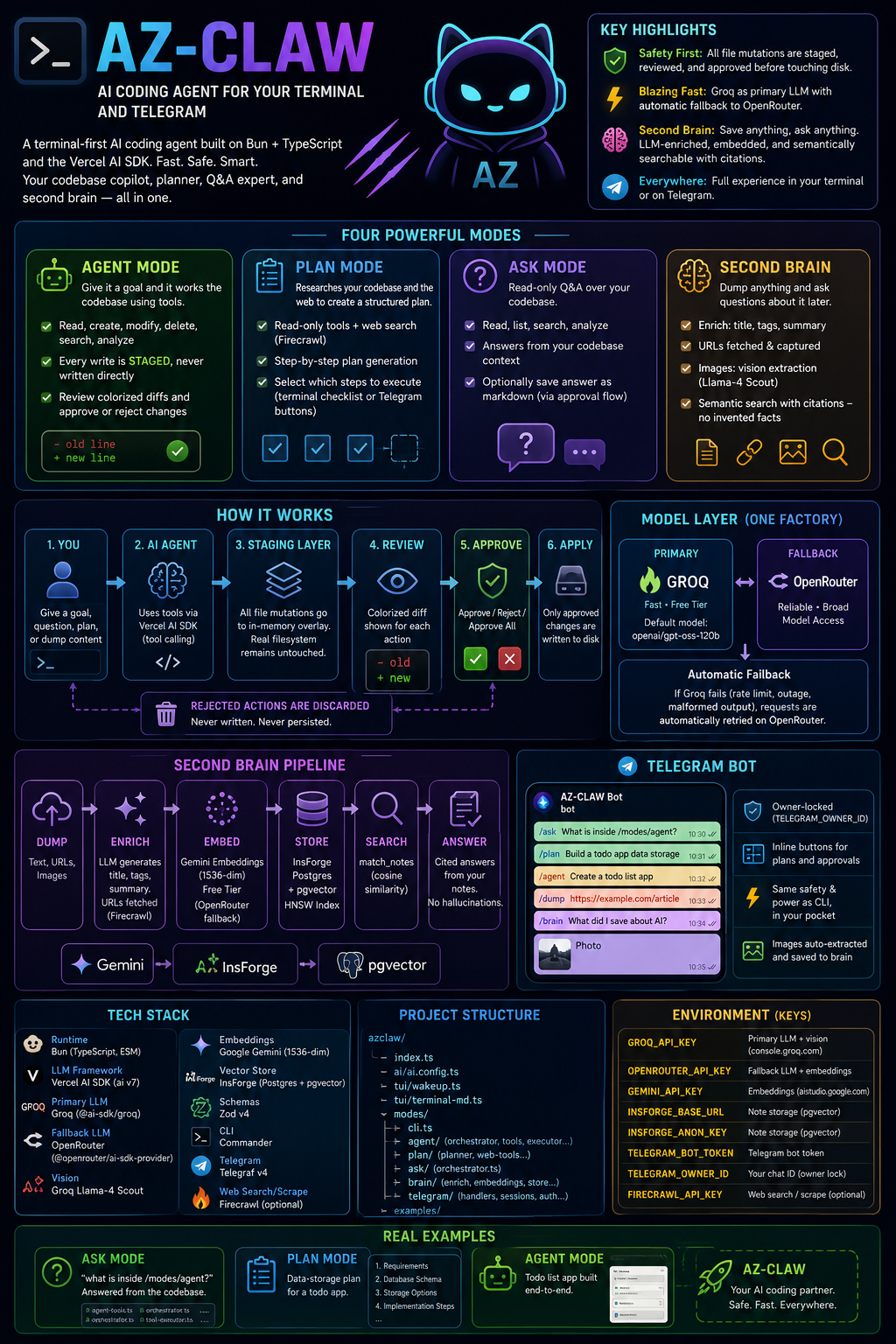
AZ-CLAW takes the other approach: the agent has all the write tools, and none of them touch disk.
The staging overlay
Two data structures do the whole job in modes/agent/tool-executor.ts:
private overlay = new Map<string, string>();
private deleted = new Set<string>();
Every write tool records intent instead of performing it:
modifyFile(rel: string, content: string): string {
  // ... validation ...
  this.overlay.set(key, content);
  this.tracker.log({
    type: "file_modify",
    path: key,
    details: { before, after: content },
    status: "pending",
  });
  return `Staged update: ${key}`;
}
createFile is the same shape. deleteFile drops the key from the overlay and adds it to deleted. Nothing is written; the tool result the model reads back is the literal string Staged update: …, so the agent knows the change is pending rather than believing it landed.
The part that makes this actually work - rather than just making the agent blind - is the read path:
getEffectiveText(rel: string): string | undefined {
  const key = this.norm(rel);
  if (this.deleted.has(key)) return undefined;
  if (this.overlay.has(key)) return this.overlay.get(key);
  const abs = this.resolveSafe(rel);
  if (!fs.existsSync(abs) || !fs.statSync(abs).isFile()) return undefined;
  return fs.readFileSync(abs, "utf8");
}
Deleted, then overlay, then disk. So the agent can create lib/parser.ts, read it back two tool calls later, modify it, and delete a file it never really had - all against a filesystem that hasn't changed. It's a copy-on-write view scoped to one run, and it's about fifteen lines.
Approval is the only path to disk
flowchart TD
  A["Goal"] --> B["Agent loop<br/>streamText + tools"]
  B --> C{"Tool kind"}
  C -- "read / list / search" --> D["Disk<br/>read-only"]
  C -- "create / modify / delete" --> E["Overlay + ActionTracker<br/>status: pending"]
  D --> B
  E --> B
  B --> F["Run ends"]
  F --> G["approval.ts<br/>walk each staged action"]
  G --> H["diff-view.ts<br/>colourised diff"]
  H --> I{"Approve?"}
  I -- "approve / approve-all" --> J["Written to disk"]
  I -- "reject" --> K["Discarded<br/>never persisted"]
When the run finishes, approval.ts walks the pending actions, diff-view.ts renders each as a unified diff (the diff package), and you answer approve, reject, or approve-all. Rejected actions are dropped - not stashed, not applied later.
The same flow exists on your phone. modes/telegram/approval-session.ts mirrors it with Telegram inline buttons, keeping a per-chat session while the agent runs.
Four modes, one safety layer
| Mode | What it does |
|---|---|
| Agent | Works the codebase with tools; every mutation staged |
| Plan | Read-only research (plus Firecrawl web search/scrape), then a step-by-step plan you pick from via checkbox menu or inline buttons |
| Ask | Read-only Q&A over the codebase; can save the answer as markdown - routed through the same approval flow |
| Second Brain | Dump text, URLs or images; ask questions later |
The Ask detail is the one I'd point at. "Save this answer to a file" is a write, so it does not get a shortcut around the approval step just because it's a nicer kind of write.
From Telegram, the same four:
| Command | What it does |
|---|---|
/ask <question> |
Read-only Q&A over the codebase |
/plan <goal> |
Plan; pick steps with inline buttons |
/agent <goal> |
Runs the agent; approve/reject with inline buttons |
/dump <anything> |
Saves text or a URL to the Second Brain |
/brain <question> |
Answers from the brain, with citations |
| Photo message | Vision extraction, then stored |
Fallback that lives in the model, not the call site
Groq is the primary LLM - fast, generous free tier - and its free tier does what free tiers do. Rather than wrapping every call in a retry, ai/ai.config.ts wraps the model object once:
function withFallback(primary: ModelObject, fallback: () => ModelObject): ModelObject {
  const rescue = (op: "doGenerate" | "doStream") => async (options: any) => {
    try {
      return await (primary[op] as any)(options);
    } catch (err) {
      console.warn(
        `[ai] ${primary.provider}/${primary.modelId} failed (${err instanceof Error ? err.message : err}); falling back to OpenRouter`,
      );
      return (fallback()[op] as any)(options);
    }
  };

  return new Proxy(primary, {
    get(target, prop, receiver) {
      if (prop === "doGenerate" || prop === "doStream") return rescue(prop);
      return Reflect.get(target, prop, receiver);
    },
  });
}
A Proxy intercepting exactly two properties. Reflect.get passes everything else - provider, modelId, specificationVersion, whatever the AI SDK asks for next - straight through, so this doesn't have to track the provider interface as it changes.
Every mode calls getAgentModel() and gets the fallback for free: agent loop, planner, Q&A, brain enrichment. Rate limit mid-stream, the warning prints, the identical call re-issues on OpenRouter, and the run continues. No mode contains the word "retry".
Default Groq model is openai/gpt-oss-120b, and the constraint on swapping it is specific: tool-calling and json_schema support, because Plan mode needs structured output and Agent mode needs tools.
Second Brain
Dump anything and ask about it later:
dump ──► enrich ──► embed ──► store ──► match_notes ──► answer
        LLM title/   Gemini    InsForge   cosine search   citations,
        tags/summary 1536-dim  notes table (HNSW index)   no invented facts
enrich.tsgenerates a title, tags and summary; URLs get fetched and their page content captured (Firecrawl when the key is set)vision.tsruns images through Groq's Llama-4 Scout, so a photo sent to the bot becomes searchable textembeddings.tsuses Gemini's free 1536-dim embeddings, with OpenRouter as fallbackstore.tswrites to InsForge (Postgres + pgvector, HNSW index) and queries amatch_notes()cosine-similarity RPC
Answers cite the stored notes they came from. That's the guardrail - a note store that invents facts is worse than no note store, because you'd trust it.
The Telegram lock
modes/telegram/auth.ts checks every update against TELEGRAM_OWNER_ID and ignores everyone else. That is the entire authorization model, and it should be, because this bot runs an agent against a checkout on your machine. Anything softer than "one chat ID, hardcoded from env" is a remote code execution feature with a chat interface.
Setup
bun install
cp .env.example .env
bun index.ts wakeup
wakeup prints a figlet banner and asks CLI or Telegram. One manual step beyond the keys: apply modes/brain/schema.sql to your InsForge database once - it creates the notes table, the match_notes() function and the HNSW index. Then bun modes/brain/smoke.ts for a round-trip check.
Keys: GROQ_API_KEY and OPENROUTER_API_KEY (+ OPENROUTER_DEFAULT_MODEL) are required; GEMINI_API_KEY and the InsForge pair are needed for the brain; the Telegram pair for the bot; FIRECRAWL_API_KEY is optional and unlocks web search in Plan and Ask.
No build step - Bun runs the TypeScript directly.
It's checked in
The examples/ folder has real, unedited output: an Ask run explaining /modes/agent from the codebase, a Plan run designing data storage for a todo app, and a todo app the agent built end to end. Asked what was inside its own agent directory, it answered:
The
/modes/agentdirectory contains core components of an AI agent management system that handles workflow, approvals, and codebase operations.
Which is a fair description of a program whose main feature is not trusting itself.